
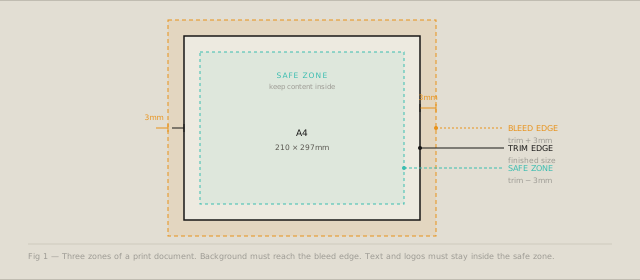
The three zones of a print document
Every print document lives inside three concentric areas, and understanding each one saves you from the phone call that starts with “the printer says the file is wrong”:
The trim — the finished size. An A4 document trims to 210 × 297mm. This is the size the client specified and the size the end product will be.
The bleed — the trim plus an extension on all four sides. Standard is 3mm per side, giving a bleed document size of 216 × 303mm for A4. Background color, images, or graphical elements that extend to the edge of the trimmed document must extend into the bleed area.
The safe zone — the trim minus an inset on all four sides. Standard is 3mm per side, giving a safe zone of 204 × 291mm for A4. No important content — text, logos, faces — should appear outside the safe zone.
Why bleed exists
Sheet-fed printing cuts multiple documents from a single large sheet. The cutting is mechanical — it is accurate to about ±0.5mm under good conditions, ±1.5mm under variable conditions. The bleed provides insurance: even if the cut is 1.5mm off, the background continues to the edge and the design reads as intended.
Without bleed, a 0.5mm miscut produces a white strip along one or more edges — a characteristic amateur mistake that is immediately visible.
Why the safe zone exists
The same mechanical tolerance that requires bleed on the outside creates risk on the inside. If text or a logo is 1mm from the trim edge, a 1.5mm miscut clips it. The safe zone provides the equivalent insurance for important content.
The standard 3mm safe zone is conservative. For documents that will be machine-cut with high repeatability (for example, business cards on a digital press), 2mm is sometimes sufficient. For documents with high-variance trimming (booklets, saddle-stitched, or manually trimmed), 5mm is safer.
Standard formats
The ISO 216 A-series derives each size from the next by halving the longer dimension:
| Format | mm | inches |
|---|---|---|
| A0 | 841 × 1189 | 33.1 × 46.8 |
| A1 | 594 × 841 | 23.4 × 33.1 |
| A2 | 420 × 594 | 16.5 × 23.4 |
| A3 | 297 × 420 | 11.7 × 16.5 |
| A4 | 210 × 297 | 8.3 × 11.7 |
| A5 | 148 × 210 | 5.8 × 8.3 |
| A6 | 105 × 148 | 4.1 × 5.8 |
The US Letter format (216 × 279mm / 8.5 × 11in) does not follow ISO 216 and does not halve cleanly. When producing documents for both European and US markets, always confirm which format the printer expects.
Business card formats
Business cards have more variation than standard formats. Common sizes:
| Country | Width × Height |
|---|---|
| Europe | 85 × 55mm |
| US/Canada | 88.9 × 50.8mm (3.5 × 2in) |
| Japan | 91 × 55mm |
| Square | 55 × 55mm |
For business cards, bleed is typically 2mm per side (not 3mm), and safe zone is 3–4mm per side due to the small size.
Resolution requirements
Print images need higher resolution than screen images because pixels are smaller. The standard requirement is 300 DPI (dots per inch) at the final print size.
Calculating required image dimensions:
Width in pixels = width in mm ÷ 25.4 × 300
Height in pixels = height in mm ÷ 25.4 × 300

A4 at 300 DPI = (210 ÷ 25.4 × 300) × (297 ÷ 25.4 × 300)
              = 2480 × 3508 pixels
For large-format printing (posters, banners), 150 DPI is acceptable because viewing distance increases. For billboards viewed at 10+ metres, 30–72 DPI is standard.
Using the Print Format Studio
The three numbers the tool gives you are the three numbers that go on every print brief:
Bleed size — hand this to the designer as the canvas size. The file must be built at this size, not the trim size. Everything that needs to bleed must extend to the edge of this canvas.
Safe zone — hand this to the designer as the content boundary. Logos, addresses, and any text the reader needs to read must stay inside.
Pixel dimensions at 300 DPI — hand this to the photographer or image supplier before the shoot or the purchase. Once an image is too small, it cannot be made larger. Specifying pixel dimensions upfront is the only reliable way to prevent resolution problems at proof stage.
Enter a custom size or choose from the A-series, common card formats, or US standards. The tool handles the arithmetic; you handle the brief.
Calculate print specifications for any format with the Print Format Studio — bleed, safe zone, and resolution in one place.