

What a modular scale is
A modular scale is a sequence produced by repeatedly multiplying a starting value by a fixed ratio. In typography, the starting value is your body text size and the ratio determines how dramatically sizes increase at each step. The result is a set of sizes where every value is mathematically related to every other — which is why a scale feels consistent even when you cannot articulate why.
The classic example is the perfect fifth (ratio 1.5). Starting from 16px:
16 × 1.500 = 24
24 × 1.500 = 36
36 × 1.500 = 54
54 × 1.500 = 81
Going downward:
16 ÷ 1.500 = 10.67Every size in the sequence is harmonically related to every other. This is why they feel consistent even without knowing the reason.
Choosing a ratio
The ratio controls the visual contrast between scale steps. A large ratio produces dramatic jumps; a small ratio produces subtle distinctions.
Common ratios and their musical equivalents:
| Ratio | Name | Use case |
|---|---|---|
| 1.067 | Minor second | Compact UIs with many levels |
| 1.125 | Major second | Data-dense interfaces |
| 1.200 | Minor third | Most UI work |
| 1.250 | Major third | Editorial, marketing |
| 1.333 | Perfect fourth | Strong visual hierarchy |
| 1.414 | Augmented fourth | High-impact headers |
| 1.500 | Perfect fifth | Dramatic contrast |
| 1.618 | Golden ratio | Print, long-form |
For most product UI, stay between 1.2 and 1.333. Below 1.2 the steps are too subtle to register. Above 1.333 the jumps start to feel disconnected rather than proportional — you end up with a 12px label and a 38px heading with nothing usable in between. For marketing and editorial work where hierarchy is the point, 1.333–1.5 earns its drama.
Base size matters
The ratio alone does not determine the scale — the base does. With a base of 13px and ratio 1.333:
10px → caption
13px → body
17px → subheading
23px → heading
30px → display
40px → hero
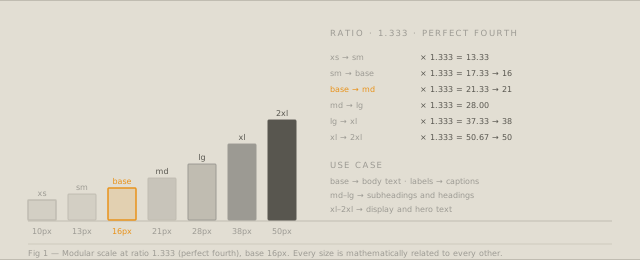
With a base of 16px and the same ratio:
12px → caption
16px → body
21px → subheading
28px → heading
38px → display
50px → hero
The proportions are identical; the absolute values shift. Choose a base that matches your smallest comfortable reading size, then let the scale determine everything above.
Using the scale in CSS
Map scale values to custom properties:
:root {
  --text-xs:   10px;   /* or 0.625rem */
  --text-sm:   13px;   /* or 0.8125rem */
  --text-base: 16px;   /* 1rem */
  --text-md:   21px;   /* 1.333rem */
  --text-lg:   28px;   /* 1.75rem */
  --text-xl:   38px;   /* 2.375rem */
  --text-2xl:  50px;   /* 3.125rem */
}
Then in components:
body         { font-size: var(--text-base); }
figcaption   { font-size: var(--text-xs); }
.label       { font-size: var(--text-sm); }
h3           { font-size: var(--text-md); }
h2           { font-size: var(--text-lg); }
h1           { font-size: var(--text-xl); }
.hero-title  { font-size: var(--text-2xl); }
Do not use every step on every page. A scale with eight steps does not mean every page needs eight type sizes. Three or four sizes is usually enough; five is the maximum before hierarchy collapses.
Fluid type with CSS clamp
Modular scales work beautifully with clamp() for fluid typography — sizes that respond to viewport width without breakpoints:
:root {
  --text-lg: clamp(21px, 3vw, 28px);
  --text-xl: clamp(28px, 4.5vw, 38px);
  --text-2xl: clamp(36px, 6vw, 50px);
}
The Modular Scale Calculator outputs clamp() values alongside fixed pixel values, scaled between a defined minimum and maximum viewport width.
Tailwind integration
If you use Tailwind, the calculator exports a fontSize theme extension. Paste it into tailwind.config.js:
theme: {
  extend: {
    fontSize: {
      'xs':   ['10px',  { lineHeight: '1.5' }],
      'sm':   ['13px',  { lineHeight: '1.6' }],
      'base': ['16px',  { lineHeight: '1.75' }],
      'md':   ['21px',  { lineHeight: '1.4' }],
      'lg':   ['28px',  { lineHeight: '1.25' }],
      'xl':   ['38px',  { lineHeight: '1.15' }],
      '2xl':  ['50px',  { lineHeight: '1.08' }],
    },
  },
},
Line height values decrease as font size increases — large text needs less line height than small text for the same visual rhythm.
Calculate your modular scale with the Modular Scale Calculator — export CSS custom properties, clamp() values, or Tailwind config.