
The padding-top hack (and why it is gone)
Before aspect-ratio landed in CSS, keeping a box proportional as its width changed meant reaching for one of the most counterintuitive hacks in front-end development — the padding-top hack:
/* The old way */
.video-wrapper {
  position: relative;
  width: 100%;
  padding-top: 56.25%; /* 9/16 = 0.5625 */
}
.video-wrapper iframe {
  position: absolute;
  inset: 0;
  width: 100%;
  height: 100%;
}
The trick works because percentage padding is calculated relative to the width of the element, not its height. A padding-top of 56.25% on a full-width element creates a height that is always 56.25% of the width — which is the 16:9 ratio.
It was clever, but it required a wrapper element and absolute positioning. The modern approach:
/* The new way */
.video-wrapper {
  width: 100%;
  aspect-ratio: 16 / 9;
}
.video-wrapper iframe {
  width: 100%;
  height: 100%;
}
Browser support for aspect-ratio is universal as of 2023.
Common ratios and what they suggest
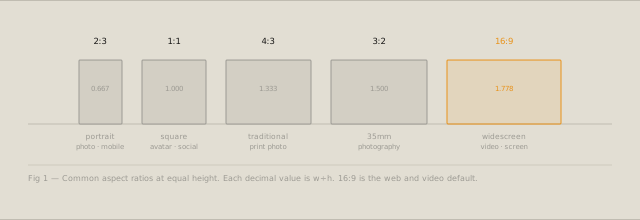
Different ratios communicate different things:
| Ratio | Decimal | Context |
|---|---|---|
| 1:1 | 1.000 | Avatar, icon, social post |
| 4:3 | 1.333 | Traditional screen, print photo |
| 3:2 | 1.500 | 35mm photography |
| 16:9 | 1.778 | Video, widescreen |
| 16:10 | 1.600 | Laptop screen |
| 21:9 | 2.333 | Ultrawide, cinematic |
| 2:3 | 0.667 | Portrait photo, mobile |
| A4 | 1.414 | Print, document |
Choosing a ratio that matches your content type reduces visual tension. A product image at 3:2 sits more naturally than the same image cropped to 16:9.
CSS aspect-ratio in practice
The property works on any block element. It sets an intrinsic ratio that the browser uses to calculate the missing dimension:
/* Fixed width, calculated height */
.card-image {
  width: 100%;
  aspect-ratio: 3 / 2;
  object-fit: cover;
}

/* Fixed height, calculated width */
.sidebar-icon {
  height: 48px;
  aspect-ratio: 1;
}
For images and videos, combine aspect-ratio with object-fit: cover to fill the box without distortion.
Aspect ratio and container queries
Container queries let you apply styles based on the size of a parent element, not the viewport. Combined with aspect-ratio, this unlocks layout patterns that were previously impossible without JavaScript:
@container (min-width: 600px) {
  .card {
    aspect-ratio: 16 / 9;
  }
}
@container (max-width: 599px) {
  .card {
    aspect-ratio: 1;
  }
}
A card that is widescreen in a large container but square in a narrow container — purely in CSS.
Calculating pixel dimensions
The Aspect Ratio Calculator solves for any missing dimension. Enter width, the calculator gives height. Enter height, it gives width. Enter both, it shows the nearest clean ratio.
Practical uses:
- Social media crops: find the exact pixel dimensions for a 1.91:1 OG image
- Video embeds: calculate the pixel height for a 16:9 embed at any width
- Print crops: find the bleed-included dimensions for a 3:2 image at A5 size
- Design handoff: give developers exact pixel dimensions for image containers
The calculator also shows the greatest common divisor reduction — so 1920×1080 is shown as 16:9, not 192:108.
Calculate any aspect ratio with the Aspect Ratio Calculator — instant dimension lookup for any width, height, or ratio.