

The three terms
These are frequently confused, so let’s be precise:
Tint — a color mixed with white. Lightness increases, saturation decreases. The hue stays the same (in theory; in practice it can shift slightly in sRGB).
Shade — a color mixed with black. Lightness decreases, saturation decreases. Can produce muddy results if done naively in sRGB.
Tone — a color mixed with grey. Both lightness and saturation move simultaneously. Useful for creating muted, sophisticated palettes.
When designers say “the 200 version of this color” they usually mean a tint. When they say “the 800 version” they usually mean a shade. Most design systems use scales from 50 (very light tint) to 950 (very dark shade).
Why naive sRGB mixing fails
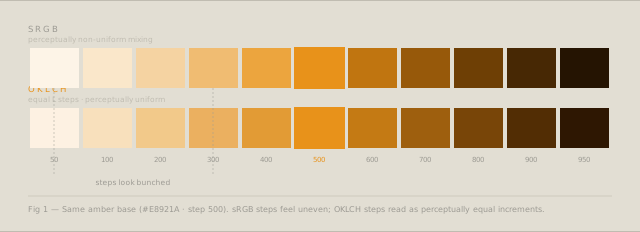
The obvious way to make a tint is to interpolate toward white in sRGB: mix 80% of the base color with 20% white. The problem is that sRGB mixes produce perceptually non-uniform steps. The jump from 100 to 200 may look much larger than the jump from 800 to 900, even if they are mathematically equal.
This produces a scale that looks bunched at one end — usually the light end — and widely spaced at the other.
Mixing in OKLCH
OKLCH fixes the perceptual uniformity problem. To create a scale, you hold the hue constant and vary the lightness in equal steps. Chroma can either be held constant or reduced slightly at the extremes (very light and very dark tones naturally have less chroma in real pigments).
Base: oklch(60% 0.18 45)   /* amber */

Step 50:  oklch(97% 0.04 45)
Step 100: oklch(93% 0.07 45)
Step 200: oklch(87% 0.10 45)
Step 300: oklch(80% 0.14 45)
Step 400: oklch(72% 0.16 45)
Step 500: oklch(60% 0.18 45)   ← base
Step 600: oklch(52% 0.17 45)
Step 700: oklch(44% 0.15 45)
Step 800: oklch(35% 0.12 45)
Step 900: oklch(26% 0.08 45)
Step 950: oklch(18% 0.05 45)
Each step is a 7–8 point change in lightness. The scale reads as evenly spaced because OKLCH’s L axis is perceptually uniform.
Chroma handling at extremes
Very light tints in OKLCH sometimes look slightly washed out if you simply reduce L without touching C. Reducing chroma slightly at both ends of the scale produces tints that feel cleaner and shades that feel richer:
- At the light end (steps 50–200): reduce C by 20–50% relative to the base
- At the dark end (steps 800–950): reduce C by 10–30% relative to the base
The Tint & Shade Generator applies a chroma curve automatically, so the output scale has the right saturation profile without manual tuning.
Assigning roles from the scale
A ten-step scale is raw material. Assigning roles makes it usable:
| Token | Step | Purpose |
|---|---|---|
color-bg | 50 | Page background |
color-surface | 100 | Card, container background |
color-border | 200–300 | Dividers, input borders |
color-muted | 400–500 | Placeholder text, icons |
color-default | 600 | Body text on light bg |
color-strong | 800 | Headings, emphasis |
color-solid | 900 | Inverted text on color bg |
The specific steps depend on your contrast requirements — always check WCAG ratios for text colors against their intended backgrounds.
Exporting for your stack
The generated scale is raw material until it lands in your tooling. The export format matters:
For CSS, the output uses custom properties — --amber-50 through --amber-950 — so you can reference them semantically anywhere in your codebase and swap the entire palette by changing one file.
For Tailwind, paste the output directly into theme.extend.colors. The scale slots in as a first-class color family alongside Tailwind’s defaults.
For Figma, the export is a structured HEX list formatted for Figma Variables. Set each step as a variable in your Primitives collection, then reference those primitives in your semantic token layer (background, surface, text) rather than using raw step values in components.
Generate a full 11-step OKLCH color scale with the Tint & Shade Generator — export CSS, Tailwind, or Figma-ready values.