
Why single-layer shadows look wrong
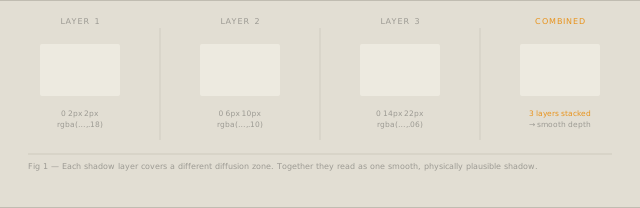
Natural shadows are not uniform blobs of darkness. As distance from the caster increases, a shadow diffuses — it becomes less opaque at the edges and more opaque close to the object. A single box-shadow cannot model this behaviour: it has one blur radius and one opacity, producing a shadow that looks the same at every distance from the edge.
The fix is to stack multiple shadows, each representing a different zone of diffusion.
The multi-layer formula
A well-designed multi-layer shadow uses three to five layers. Each subsequent layer is:
- Larger in offset (further from the object)
- Larger in blur radius (more diffused)
- Lower in opacity (lighter)
/* A three-layer example */
box-shadow:
  0 1px 2px   rgba(24, 23, 22, 0.10),
  0 4px 8px   rgba(24, 23, 22, 0.07),
  0 12px 24px rgba(24, 23, 22, 0.05);
The combined effect reads as a single, smooth shadow. Each individual layer is subtle enough that the stacking is invisible — only the result is perceived.
Color tinting with OKLCH
Real shadows are not grey. In natural light, shadows pick up the complementary color of the light source — a warm light casts a cool shadow. On a cream background, the shadow will have a slight warm-neutral tone.
Using OKLCH lets you specify shadow color as a tinted dark:
/* Shadow tinted to match warm background */
box-shadow:
  0 1px 3px   oklch(20% 0.04 60 / 0.12),
  0 4px 12px  oklch(20% 0.04 60 / 0.08),
  0 16px 32px oklch(20% 0.04 60 / 0.05);
The OKLCH values here say: very dark (L=20%), slightly warm (C=0.04, H=60 is amber direction), at varying opacity. The result is a shadow that feels physically accurate for a warm-background design system.
Elevation tokens
In a design system, shadows are not one-off decisions — they represent elevation levels. A floating button is at a higher elevation than a card, which is at a higher elevation than a flat list item.
Define four or five elevation tokens:
:root {
  --shadow-sm:  0 1px 2px rgba(24,23,22,.08);
  --shadow-md:  0 1px 3px rgba(24,23,22,.08), 0 4px 12px rgba(24,23,22,.06);
  --shadow-lg:  0 1px 4px rgba(24,23,22,.08), 0 6px 16px rgba(24,23,22,.06), 0 20px 40px rgba(24,23,22,.05);
  --shadow-xl:  /* modal level */;
  --shadow-2xl: /* tooltip/popover level */;
}
Components reference tokens, not raw values. When you change the design system’s shadow style, every component updates.
Hover elevation
Interactive elements often move to a higher elevation on hover. A card at --shadow-md might rise to --shadow-lg on hover. This reads as the card lifting toward the user — a physically intuitive interaction signal.
.card {
  box-shadow: var(--shadow-md);
  transition: box-shadow 0.2s ease, transform 0.2s ease;
}
.card:hover {
  box-shadow: var(--shadow-lg);
  transform: translateY(-2px);
}
The 2px translateY reinforces the elevation change visually. Keep transform values small — the shadow is doing most of the work.
Using the Shadow Studio
The tool works backwards from a result. Set the shadow angle, the maximum offset, and the color tint — and it generates the full multi-layer stack that produces that result. You do not need to calculate individual layers.
The elevation token export is the most useful output for design system work: five named levels (sm through 2xl), each a multi-layer stack, ready to drop into CSS custom properties or Tailwind’s boxShadow config. Components reference tokens, not raw values. When you change the shadow language system-wide, one edit updates everything.
The hover pair export gives you the resting shadow and its elevated counterpart together, including the translateY value that reinforces the lift visually.
Generate a full elevation system with the Shadow & Elevation Studio — export CSS custom properties or Tailwind config.